Your Job Search
Command Center.
Group every application in one place: tailored CVs, practice interviews, skill gap analyses, dates, and notes. List, kanban, grid, or calendar view. Included on every plan.
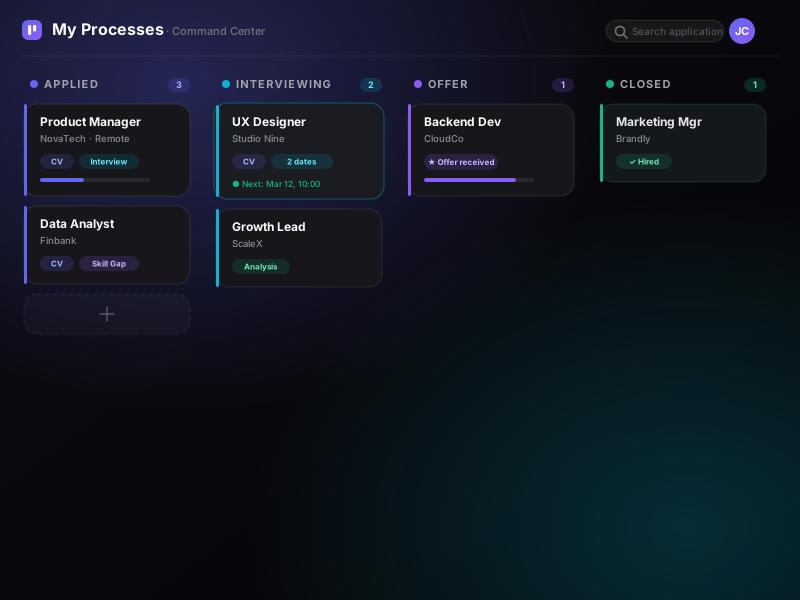
See My Processes in action
A one-minute tour of your job-search command center.
How to organize yourself
One process per application. Everything else links automatically.
Create a process per application
Paste the job URL or text. Title, company, requirements get extracted and the process is created.
Link CVs and interviews
Every Tailor CV, practice interview, and analysis is automatically linked to its process.
Move through the funnel
Move the process between states: Applied, Interviewing, Offer, Closed.
Follow your process recommendations
Every process has its own panel with summary, next actions, and key skills to reinforce.
What My Processes includes
It's the first step when you log into Jobifly — the welcome banner invites you to create your first process.
-
Kanban board with 4 statuses
Applied · Interviewing · Offer · Closed. Drag-and-drop between columns.
-
Interview calendar with multiple dates
If you have 3 rounds at a company, you see them all — together with rounds from other companies.
-
Automatic linking of every practice, CV, and analysis
Every Tailor CV, Practice session, and Analysis report is tied to its matching process.
-
Per-process prioritized recommendations
Process summary, next actions, and key skills to reinforce — specific to that application.
-
Notes, job description in markdown
Take notes at every step. The job description is kept in markdown.
-
Archive for closed processes
Keep the board clean without losing history.
-
Deep-link from wizards and notifications
Any wizard you open can take you straight to the matching process.
Related guides
Organizing the search is half the work; sustaining it is the other half.
How to organize your job search
A system so no application slips through and you never walk in without context.
Job hunting without burning out
Why the search wears you down, and how to sustain it without burning out.
Interviewing again after 40
What changed in hiring, and how to get back the practice of telling your work.
Ready for your next interview?
Start free with 20 interview minutes and usage credits included. No credit card required.